
Almost every day I have someone ask me how to print the patterns that are here on Moogly. Using cut and paste can work, or trying to print the screen - but that can grab ads, comments, and all kinds of stuff that will waste paper and ink. There's a much simpler option - and it allows you to download them as PDFs too! It's the Print Friendly button, and here's how to use it.
How to Use the Print Friendly Button
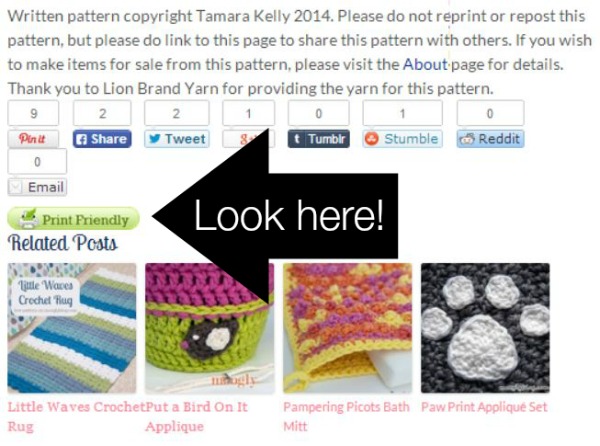
First, you need to find the Print Friendly button. It's at the bottom of each post on Moogly - even the ones you wouldn't necessarily want to print. Here's where to find it on a recent free pattern. It's below the social share buttons, and above the related posts.
Click that button, and a new window will appear! If it does not, check to make sure that you don't have it blocked with pop up blocking software. It can take a little bit of time to load, so be patient. What appears will have no ads or comments attached!
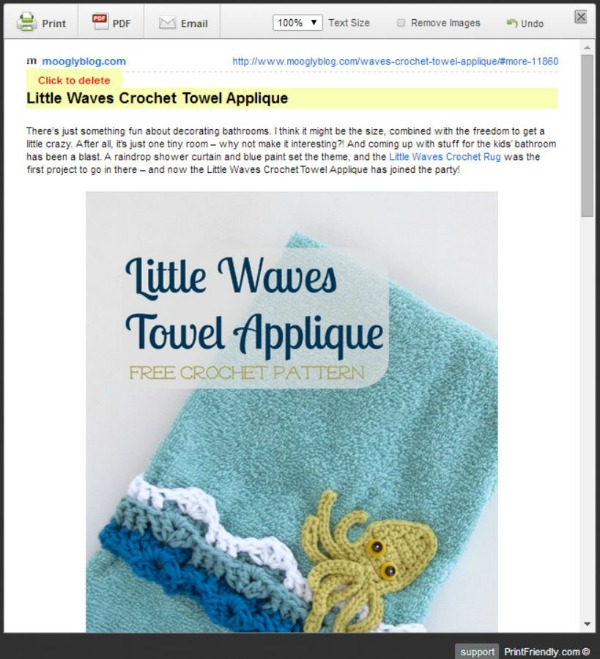
Now you have several options. Look at the bar across the top - you can Print, create a PDF, Email it to someone, change the Text size, Remove all the images, or Undo (go back a step).
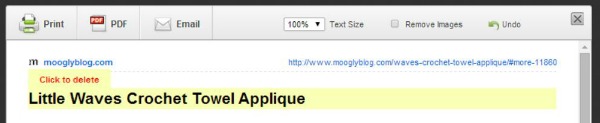
Also, notice how there is a section that's highlighted in yellow and says "Click to delete"? That's a great way to pare down the pages that you want to print. A lot of times there are chatty bits, extra photos, step by step guides, or other parts of the blog post that you won't want to print. Just click on the parts you don't want to print out, and use the Undo button if you click on something you meant to keep.
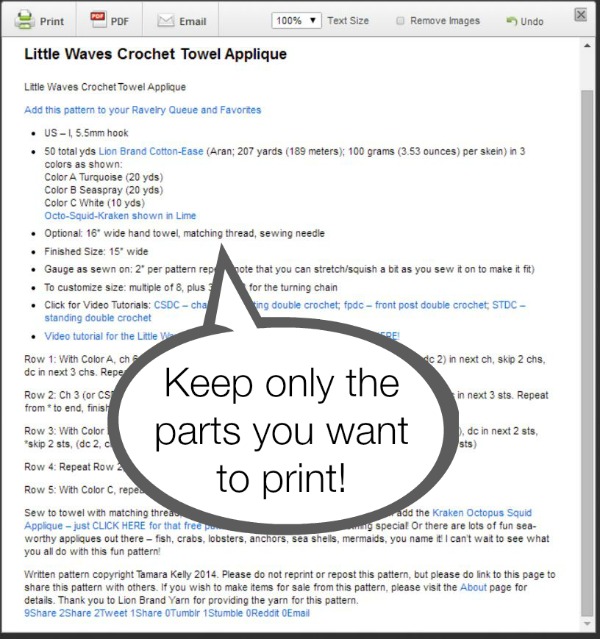
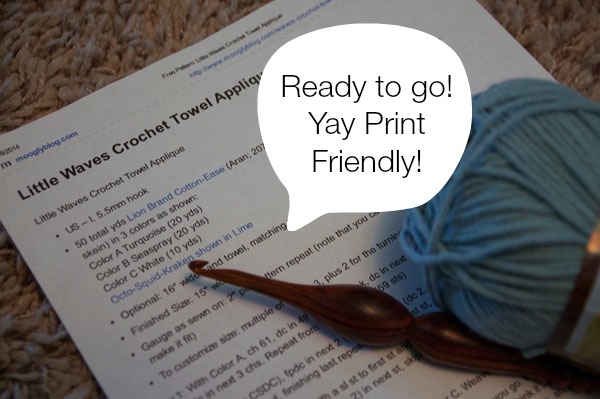
Once you've got it looking the way you want it, you can hit the Print button! What shows up next will depend on your computer, operating system, and browser. But it should be easy to print from there! No ads, no comments, just the parts of the pattern you want.
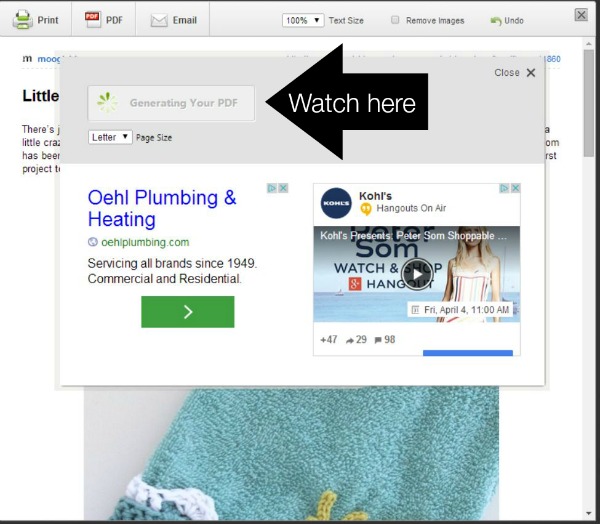
But let's say you don't want to Print - you want a PDF you can download! That's easy too. Go back to the top and click the PDF button. You should get a little pop up window, like so. Generating the PDF can take a few minutes. Sometimes an ad will appear on here that says "download" on it - this is not the PDF download you're looking for. Be patient, and watch the spinny green circle thingy.
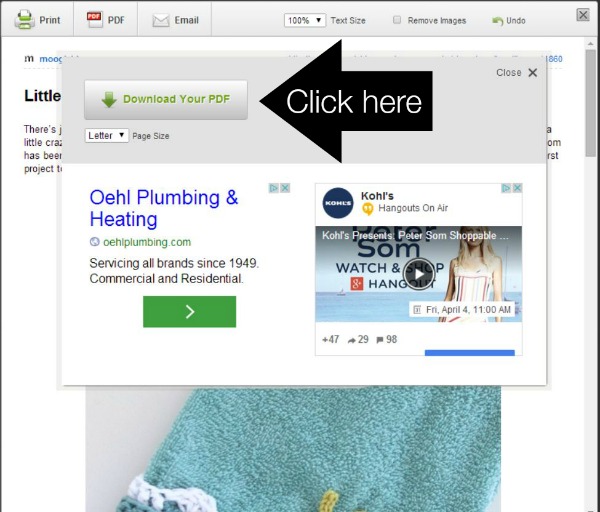
Ta-da! The PDF is ready to download. Click on the button and it will download straight to your computer! Where it will actually be on your computer depends on how you have your computer set up. Most likely it's in your Downloads file. Check your Recent Downloads if you can't seem to find it - it's there somewhere!
And that's all there is to it! You can Print, you can Download, you can add Moogly patterns to your collection! Or you can bookmark the link in your browser or pin it on Pinterest, and then work the patterns directly from the screen, saving both hard drive space and printer ink.
How Do I Print a Pattern on a Blog without the Button?
Easy peasy - open a second tab in your browser to PrintFriendly.com. Enter the URL of the web page you want to print in the box provided. And from there, it's just as shown above!
Is the Moogly Print Friendly Button Not Working?
Shoot! It's an external plugin - I can't control when they do updates and maintenance, and I can't fix their glitches. But nine times out of ten, even when the button isn't working, opening Print Friendly in a second tab (as described just above) will work. If that fails, there are other options: you can highlight and right click to Print on some browsers, you can copy and paste Moogly blog posts into a word processing document, or you can get the CleanPrint Plugin for Chrome.
But Please Note!
One thing though - these printed and downloaded copies are for your PERSONAL USE ONLY! If you have a friend who wants to know where you got that pattern, send him or her the link please, don't make copies of the patterns and hand them out. And do not upload the PDF to a sharing site or group! Without visitors to the blogs, free pattern designers like myself can't afford to keep designing. It's an easy way to keep the free patterns coming!
Thanks so much for reading! Get Moogly on your favorite social media sites: Facebook, Twitter, G+, Pinterest, Instagram, and Tumblr!


ricky salinas says
when I click on the print friendly button to print a pattern, nothing happens.
Tamara Kelly says
Do you have a pop up blocker installed? That might be the culprit.
Vera says
Is there a “multiple” number like 5+2.?
Lorinda says
Thanks for taking the time and doing such a fine job of explaining this all. 🙂
Tamara Kelly says
😀 You're very welcome Lorinda!
Keith says
Just wanted to say thanks for all the great stuff you put on your site, patterns stitches videos loads of stuff. As for going out of your way to explain things, you're very good. Thank you. Keith xx
Tamara Kelly says
Thank you so much Keith! I appreciate you saying so!
marjorie says
I want to copy the griddle pattern , How do i do that. marjorie
Tamara Kelly says
Hi marjorie! If you look for the print friendly button at the bottom of the Griddle Stitch post you'll be able to create a printable page, just as described here. You won't be able to print out the video of course, but the photos and written instructions are all printable.
Debbie Thurmond says
I love the Print Friendly button and have never had a problem with it at all until this past week. All of a sudden, many times now, instead of taking me to the normal Print Friendly page, it takes me right to my printer status, to click to print. I always save my favorite patterns on my external hard drive and prefer the PDF format rather than simply copy and paste to a Doc format. I thought at first that I needed to reboot, but it didn't help. It appears to randomly be happening from one site to another. I am wondering if they have changed anything. Crazy, huh?
Tamara Kelly says
Oh dear! It's an outside service that is essentially linked, and they do have these issues once in a great while. I just tried it and it seems to be working normally for now. Sorry about that!
Laurel says
I love your Print-Friendly button and especially the PDF download option. Together they allow me to download any of the beautiful patterns I find on your site to my iPad, where they are stored on my device (I open them in my Kindle app). If I want to print a copy later, I'll know where to find it online, but the patterns are with me when I shop, or anytime I want to consider my next Moogly project! Thank you for going out of your way to consider your readers' ease of use. 🙂
Tamara Kelly says
😀 Thank you so much Laurel!
Stacie Leffler says
I love this feature,,, wish it was available on more websites..... Also,,, love your patterns and tutorials,,, Thanks so much 😉
Tamara Kelly says
Thanks so much Stacie!
Penelope Pitstop says
LOVE the "print friendly" button! I wish ALL blogs would use it. I download patterns as a PDF and save them on my tablet - that way i don't have to actually print them all out. Thanks for all you do! 🙂
Tamara Kelly says
😀 Thank you so much Penelope!
Deborah says
Hello Tamara Kelly,
How do I get Moogly on my Facebook page? I love Moogly! Thank you so much for all of your awesome tutorials and for being sooo generous! You are a true blessing!
Be blessed,
Debbie
Tamara Kelly says
Hi Debbie! Thank you so much! 😀 You can Like Moogly on Facebook at https://www.facebook.com/mooglystore 🙂
Angela Brown says
Hi - I am late to trying to do a Sophie - I have twice used your print friendly button - for part one I did not remove all the unnecessary stuff so it printed out 10 pages. Second time around I reread your instructions and removed all the stuff I did not need. Part one I printed in normal A4 format, but Part 2 a friend suggested I print in booklet format. My point isthis in botr parts it has printed with bits of pictures on one page and then a continuation of the other bit of the pic on the other side. Please let me know if this is normal - I dont want to keep on printing them out like this if I am making a simple mistake. Thank you
Tamara Kelly says
I haven't tried to print Sophie specifically, but I haven't tried shifting photos through Print Friendly either. It's a free service, so that might be the best it can do.
Trish Stevens says
Thank you! I didn't realise there was a print friendly button.
Tamara Kelly says
🙂 You're very welcome!
Lisa says
I first realized what Print Friendly was from your blog, and it was just awesome. Then I found Printfriendly.com, and OMG it was like Christmas morning! I love it.
Thank you so much for the intro,
Lisa in Alabama
Tamara Kelly says
😀 I'm so glad you like it Lisa! It's so useful!
CrochetingMom says
January 1st, 2016
Good evening,
I was trying to print this Free Pattern and looked where you indicated that the Printer Friendly button is supposed to be, and there is no button ti be found any where on the Web page... So you might want to look at it and then make changes if possible.
Tamara Kelly says
It seems that the external plugin must have gone down for maintenance for a little while. It's back up now. 🙂
Gail says
Thanks for adding the Print Friendly button on your site. I have to open items in Safari where I have the Print Friendly button, this just saves me one step when I save patterns and tips, etc. from your site. Thank you so much...
Tamara Kelly says
I'm so glad it works well for you Gail! 🙂
Beverly Ondarcho says
Tamara I'm so speechless( yes really) I can't say enough how you are caring and compassionate about everything you do. Thank you for the easy peasy free patterns, the print friendly button, and leaving great quick replies.
You should be named, " Queen Bee in Crochet" we all love you, THANK you.
Bev O.
Jacksonville, FL
Tamara Kelly says
♥ Thank you so much Beverly! You are too kind!
Gloria murphy says
Thank you for this complete print friendly tutorial. I've learned so much from all your tutorials and I've been able to graduate from crocheted scarves!
You were in my area a few years ago in San Luis Obispo teaching a class at a yarn shop. I wasn't able to come and I was wondering if you will ever come back again.
Tamara Kelly says
I'm so glad to hear it, thank you Gloria!
That was so fun, and SLO is such a wonderful place to visit. I have a dear friend who lives there so I do very much hope to come again, and teach again if possible! Not this summer though, I'm afraid.
Jean Jones says
I gave up crocheting years ago because I couldn't keep the edges of my projects straight, got frustrated and gave up. About a year ago I was determined to try again. I found your site and it has been a godsend! I love your patterns and can't tell you how many I've used. The PRINT FRIENDLY button is fantastic! It makes it so easy to save a pattern to use at a later time. Your post(s) are the first thing I open every day. THANK YOU
Tamara Kelly says
Thank you so much Jean! I'm so happy to read your comment today! 😀
Brenda Hoppemoogly says
Hello, can you help me, what is the name of the other wrap. And the pattern. I have the Alapaca your wrap. , i would really like the other one. Thank you for the beautiful patterns.
Tamara Kelly says
Hi Brenda! I want to help but I have a bunch of wrap patterns and I'm not seeing any of them on this page to know which you are referring to. But you can find them all here: https://www.mooglyblog.com/category/free-moogly-patterns/ 🙂
Jean J says
I notice the last time I wrote to you was July 2017. Well, I'm stuck and need your help. Just tried downloading your latest hat pattern and having trouble with the chart and the chart key. Only part of it will print and it is too large to fit in the document. I've tried everything I know how to do and still can't get it copied, etc. HELP!
No problem with the written directions.
Tamara Kelly says
Hi Jean! In the Print Friendly window there is a little box with what looks like a mountain in it, and it's set at 100%. To print the chart, first click on everything else on the page to get rid of it - printing videos does no one any good lol. Then, change the percentage next to the mountain to 50%. I just printed one out and it was all on one page. 🙂
Jean Jones says
Will give it a try. I feel so dumb when I don't know how to do something. Thanks for the fast reply!
deborah donnelly says
Thank you for all the info you have posted above I am going to save it in case I should need it again.I am not very computer literate,lol. I do really love the Printer Friendly button,I can print off when ever I am going to do the pattern.
Thank you for all your instructions with patterns even for an old timer like me there is always lots to learn.
Jean J. says
Deboraqh, I agree with you. Not only do I get patterns but I learn more about using my computer. So...it's two for one. lol
Tamara Kelly says
🙂 You are very welcome!
D. JAYASHREE says
Is there I can see a video tutorial on how to do this "Brown Butter Shawl"...... Pattern definitely helps; but a video tutorial is more helpful.... Please suggest
Tamara Kelly says
Yes! It's linked in the pattern and at https://www.mooglyblog.com/brown-butter-shawl-tutorial/ 🙂
Nara Rejane says
Boa tarde! Meu nome é Nara Rejane.
Não entendi o formato da base da bolsa e também a não entendi a montagem da tele rígida na bolsa.
Obrigada!!!
Tamara Kelly says
Hi Nara! If it's the Ring Rose Bag, I've added a video tutorial that should help a bit!